![[LOGO]-Ulixe_Nova-positive](https://www.ulixenova.com/wp-content/uploads/2025/01/LOGO-Ulixe_Nova-positivo.png#25)

10/07/2024
RxJS: the art of responsive programming with Angular
17/03/2023
Discover the art of responsive programming with Angular and RxJS. Handle asynchronous events and optimize your code. Learn how to use Observable, Observer, Subscription, and RxJS operators to create data streams and manipulate them.

RxJS is an event-driven library of Javascript, usable with React, with which you can manage sequences of events that can occur in a web application.
RxJS, in particular, is a great tool that allows us to handle asynchronous events very efficiently. Reactive Extensions Library for JavaScript comes to our aid when we need to develop an application with a reactive type of programming.
Having even a basic knowledge of this library can help to write cleaner code. In many cases even to have easier management of the same code (with exceptions of course!).
Index
What is reactive programming with RxJs
Reactive programming is a way of programming in which the application is always ready to respond to any changes that occur within the system.
With reactive programming you write code that is constantly listening for events or changes in the state of the application.
In RxJS, this is possible through the use of Observables. Let's see what they are and how they work.
Observable, Observer and Subscription in reactive programming
In RxJs a data stream is called an Observable, and in order to access this data we need to perform asubscription (Subscription). Every time we have new data on the stream a function will be executed, all asynchronously.
When we use Observable data types, we need an object that observes the data and is able to receive its values. We are talking about an Observer.
Think, for example, of a form that receives data entered by the user. When the user fills out the form, the data is sent as a data stream to the Observable, which in turn notifies the Observer of the data entered by the user. For example, via a backend function.
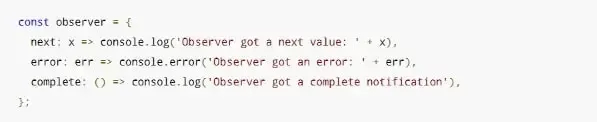
Example of observer
Source: RxJS Dev
We can see that an Observer has multiple callbacks where:
- next: is the function, always present, that is called every time when a new data item is sent to the stream;
- error: is the method that is used by the Observer when it receives an error. In this case theexecution of the Observable is aborted;
- complete: this function is used to receive a worthless notification;
Good, but now we need to understand how we can create our flows and possibly manipulate them.
Never fear, RxJs puts operators at our disposal, let's see how to do it.
Operators for creating observables in RxJS
In RxJS the most common creation operators we find of(), from(), fromEvent(source, 'event').
The of() and from() operators are similar because both are used to create observable data and send it one after the other. The difference is that from() uses data from an Array or Promise, while of() creates it directly.
Instead, with the fromEvent(source, 'event') operator we can create an observable from an event. Two arguments must be used as input in the function : first, the source issuing the event and, second, the type of event.
For example, think of a search field where we are going to intercept the keyup() event from the keyboard. With fromEvent() we can capture the event, isolate the input value, and eventually leverage it to make an HTTP call to a back-end server.
RxJS: manipulating observables
In addition to Observable creation, with RxJs it is possible to filter, map, concatenate, combine, switch from one stream to another etc. with ease thanks to thepipe operator.
But let's go in order...
Before we do the Subscription to our Observable , it is possible that our data needs to be shown differently from how it comes from the stream; therefore, we need to make some changes.
For example, let's think of a stream of numbers that comes to us in the form of an Observable, however, we are interested in having all those numbers multiplied by ten in the output.
Okay, what do we do?
Sure enough, we first create a stream, and since our numbers are not part of an Array and not derived from a Promise, we use the of() operator. Before we subscribe to theobservable, we concatenate the pipe() operator and inside it we go to use map(), which will take every single piece of data and we tell it to multiply it by ten.
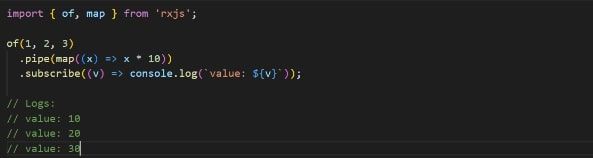
Edit observable data
Similarly, we can use other operators that RxJs also provides us with in combination with each other. For example, suppose we want to multiply by ten only multiples of two; in this case before map() we will use the filter() operator.
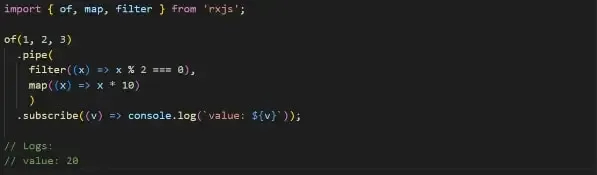
Filtering Numbers with RxJS Operators
What are Marble Diagrams
To understand the behavior of an Observable, especially after applying one or more operators, we can make use of a tool, the so-called Marble Diagrams.
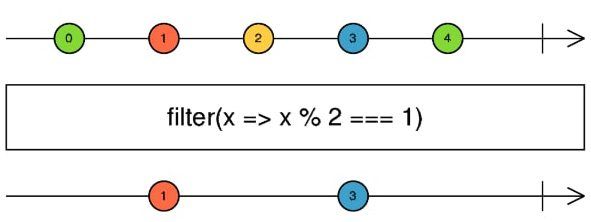
Marble Diagrams
Let's take an example found on the official documentation and try to interpret it.

Observable data stream
In the first part, the initial data stream is represented, which consists of numbers, so we have an Observable.

Edit stream in RxJS
In this rectangle, the operator we are using to modify the stream data is usually inserted.

Observable filtered
At the end, the observable with the filtered data is shown.
Reactive programming with RxJs in Angular
Since Angular version 2.0, the RxJs library has been introduced that provides, precisely, the Observable data type.
One example, probably the most widely used, is related to HTTP calls where through the HttpClientModule and HttpClient modules we have the ability to query a server and have the data returned to us in the form of an Observable, with all the benefits that it entails.
Assuming that we want to retrieve a list of users from a server via an API call, with Angular we are going to use the modules mentioned above that will transform and return the call into an Observable; in this way:
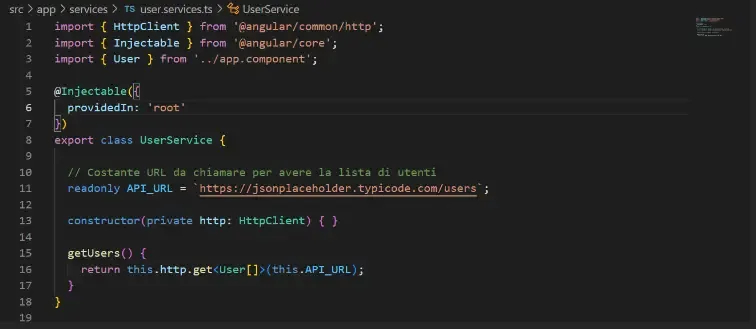
Retrieving a list of users via API call
The getUsers() method is what we are interested in and that is where our data stream will be encapsulated, but until we make a subscription, we cannot take advantage of this data. So the second step will be to make a Subscription, collect the data and display it graphically, come on!
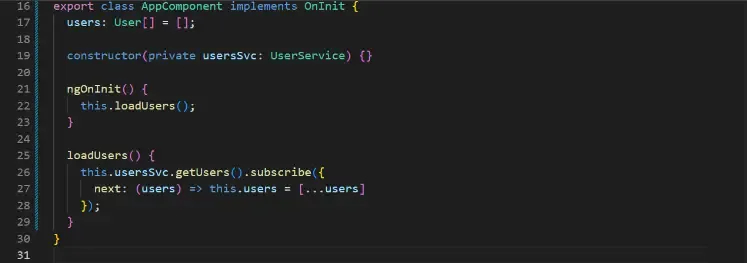
Subscription
In another component, in its .ts (TypeScript), we're going to subscribe to theObservable , and since we're now in the Observer object , via the next() method we can take our data (array of users in this case) and copy it into a variable(users) in our component that we're going to use in the .html file where the names of the users will be shown.

Next() method
Eventually, we can use our array of users and display it graphically.

Output array of users
As in the previous examples, we can concatenate the pipe() operator and make changes to our flow before making the Subscription according to our development needs!
If we had not used the BehaviorSubject in the service, we would have burdened the application both on the back-end side but also on the front-end side since in order to get our list of users we have to call up the server!
Obviously we are talking about only two components here, but imagine in an application with hundreds of components and services how many server calls we could save.
Another use of reactive programming in Angular is related to forms, and for that it provides us with a module, ReactiveFormsModule, with which we can manage our forms very efficiently thanks to controls that we will do directly in our .ts file.
What are Subjects and their use in Angular
Subjects are special types of Observables that are used to perform the multicasting of information, i.e., transmitting a piece of information to multiple Observers.

Subject for multicasting information
What we will see in the console resulting from the code written above will be:

Display in console
We note that value 1 is not shown, this is because Subjects inform Subscribers of the notified values only after a Subscription by a Subscriber, while value 2 is received only from the first Subscription but not from the second.
The special feature of Subjects is that, by simply invoking the next() method, they allow us to output values.
There are 4 types of Subjects, but we will give an example using one of them, namely BehaviorSubject, but of course I invite you to learn more about the others.
An integration in an Angular project of BehaviorSubject could be effective for us when we need to show data to multiple components, storing the latter in a service.
Our service will result as follows:
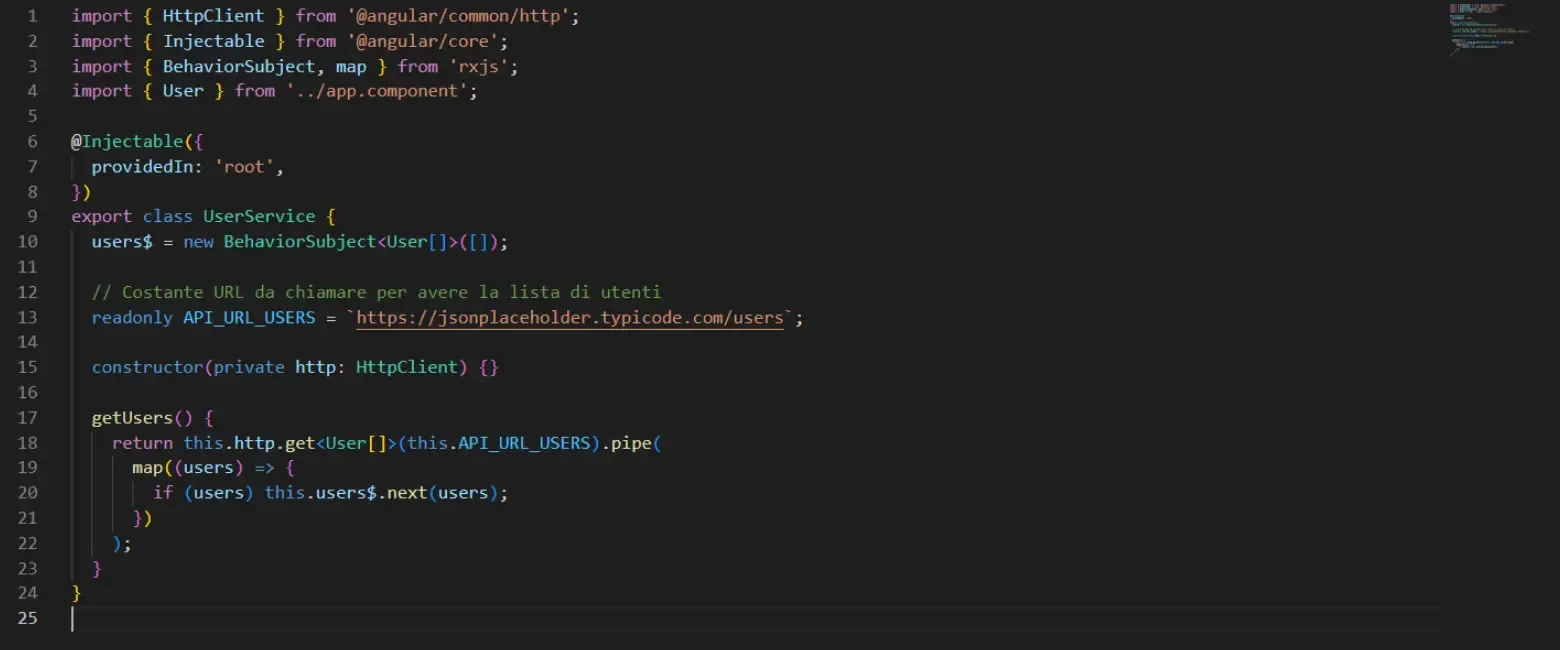
Operator BehaviorSubject
A BehaviorSubject needs an initial value, and since we know that the server will return an array of users we initialize it with empty arrays.
WithRxJs pipe() operator, I go to map() the response (if it exists) from the server and pass it with the next() method to our BehaviorSubject.
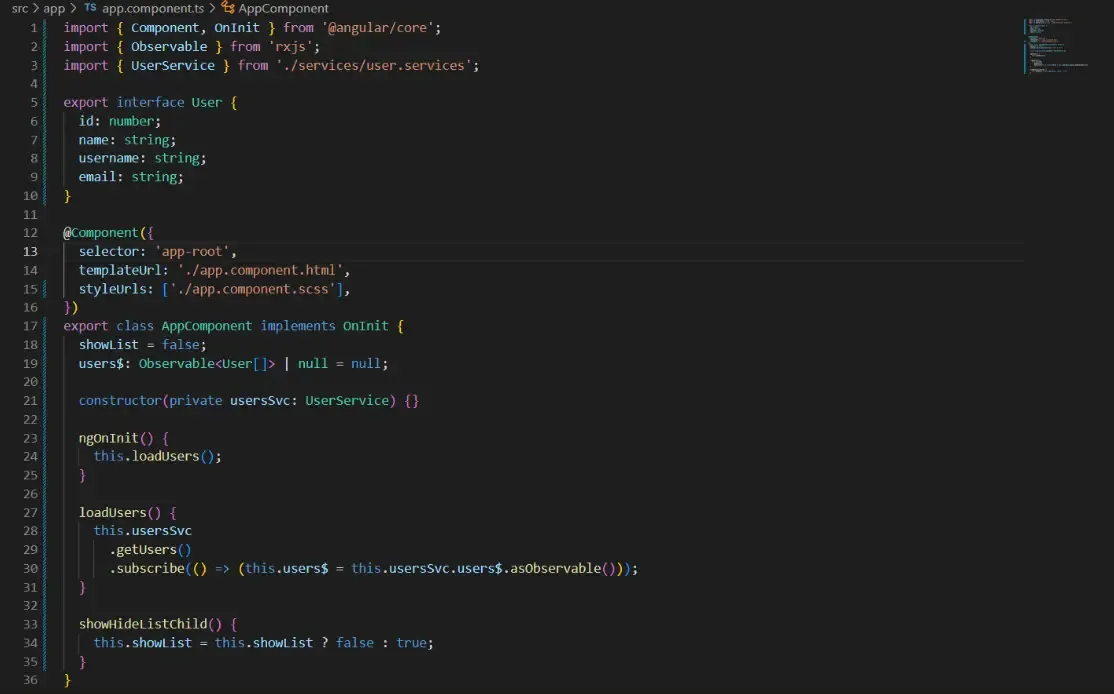
Pipe() operator
Let us now see how to retrieve this data, and with a single Subscription made in the AppComponent component in this case, we can then keep the list of users in memory and also display it in another component that we will call ChilComponent.
In the .ts file of AppComponent we initialize a property users$ of type Observable, this is because we are going to use in method asObservable() on our BehaviorSubject which will return a new Observable that we can use in the .html file with Angular's async pipe.
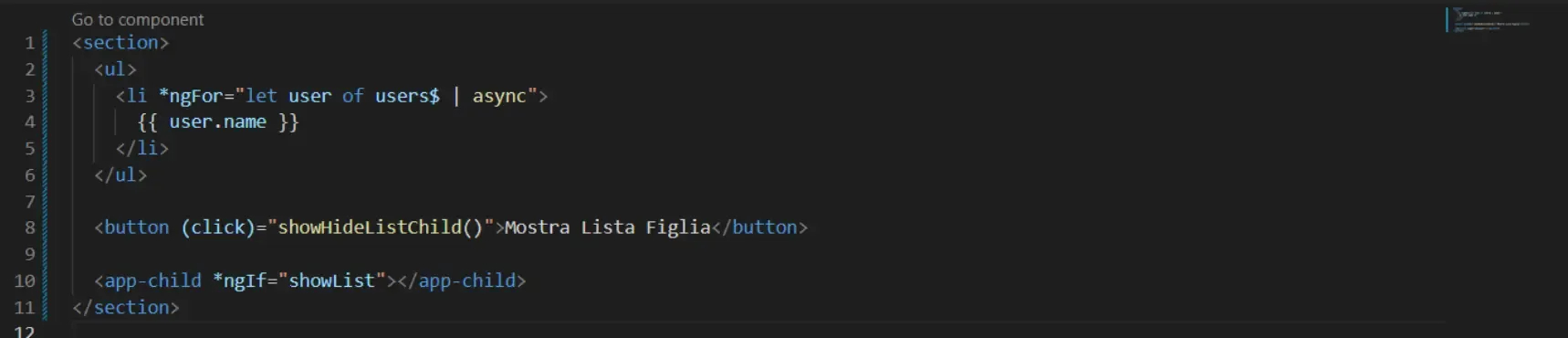
Method asObservable() on the BehaviorSubject
So we will have:

Result of asObservable() on the BehaviorSubject
In the ChilComponent we will have this situation:
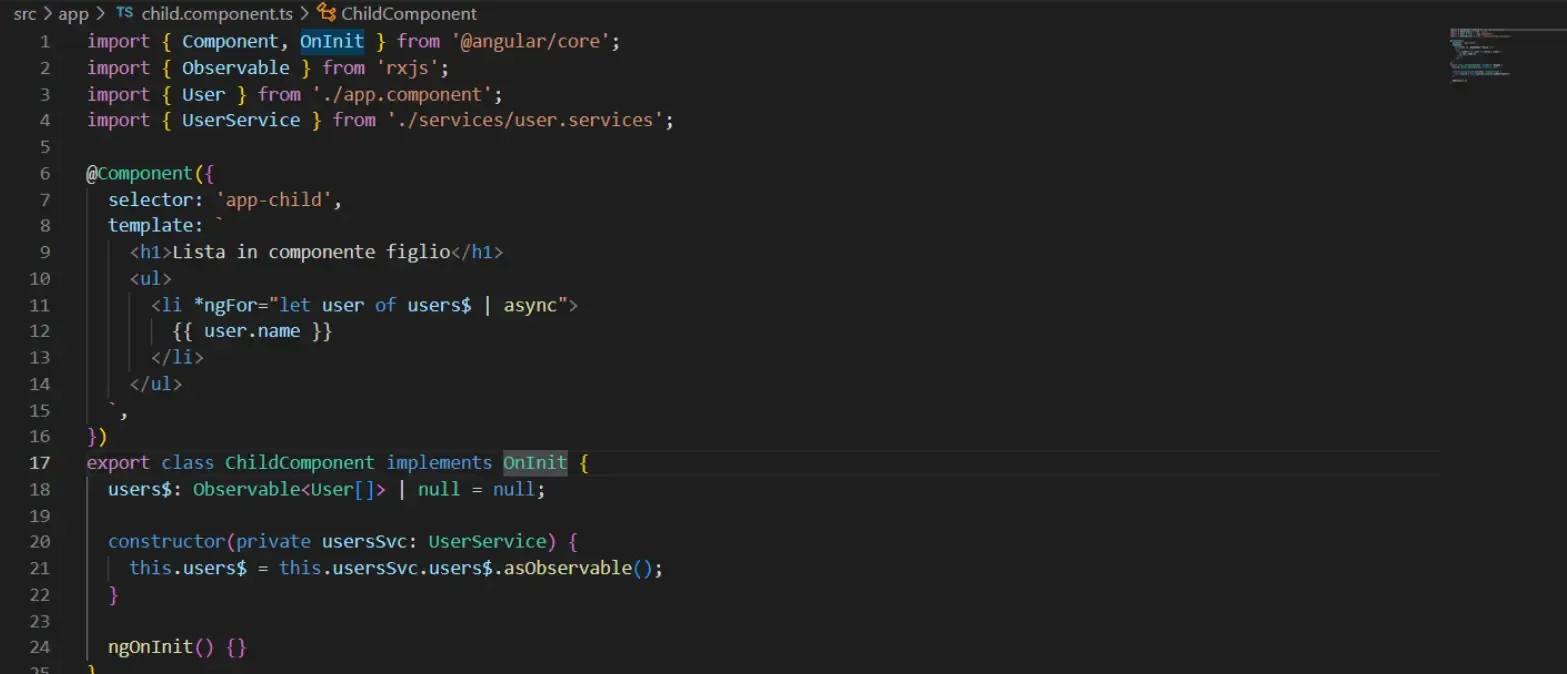
ChilComponent Visualization
We no longer have to make a call to the server here, but can directly take advantage of the data that the BehaviorSubject will keep in memory. In this way we also 'lighten' the back-end by handling a front-end side state.
So upon clicking on 'Show Daughter List' we will have our list of users without calling up a back-end:
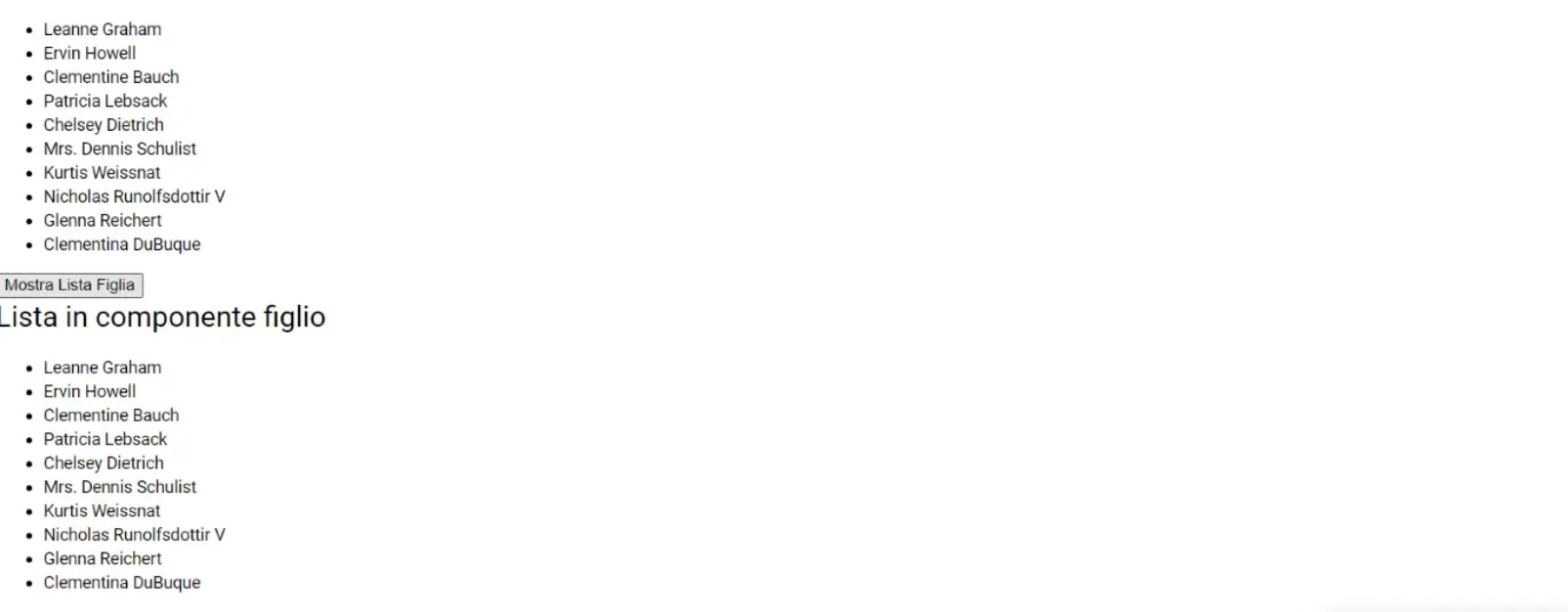
Daughter List
Conclusions
RxJs is a great tool for developing responsive applications but also for managing states.
Its use in Angular is very present and the tools it provides us with are really many and very effective. With this library we can give our projects a boost, make them more code-readable and even, why not, more modern!
I invite you, if this topic fascinates you, to learn more about the use of Subjects and use RxJs operators in your projects, both studio and real-world. Front-End.