![[LOGO]-Ulixe_Nova-positive](https://www.ulixenova.com/wp-content/uploads/2025/01/LOGO-Ulixe_Nova-positivo.png#25)


10/07/2024
From Code to Vision Pro: Exploring iOS 17 and the Fate of Apps
19/01/2024
In this article, we will explore the latest improvements in UIKit and SwiftUI, Vision Pro, and SwiftData, diving together into the prospects for the future of iOS applications.

Index
- iOS17: inside the User Interface of bitten apple
- SwiftData, the library that brings a breath of fresh air for DBs
- Xcode: Centralize localization...from today you can!
- Vision Pro: new product, new OS
- Does it still make sense to create new apps with UIKit in 2024?
With the introduction of iOS 17, Apple's development ecosystem is evolving once again, bringing with it numerous new features. In this article, we will explore the latest innovations in UIKit and SwiftUI, SwiftData, Xcode, and discover the revolutionary Vision Pro.
Let's explore together into the prospects for the future of iOS applications.
iOS17: inside the User Interface of bitten apple
Few things are certain in June: the beginning of summer, the end of school classes, yet another Latin catchphrase that will climb the charts and we'll forget in October, WWDC. I also wanted to add a national soccer tournament, but the last one held in December last year complicated everything!
As we look forward to the 2024 edition, let' s go over the new features announced at the last conference held last summer, which put so much meat on the table!
Let's start right away with the most important language-side innovations in the two frameworks UIKit and SwiftUI. Read my article before continuing if you want to know what they are!
UIKit: new features in iOS17
Let's start by examining the new features introduced in iOS UIKit.
- Code preview
One of the flaws of UIKit compared with SwiftUI was undoubtedly the possibility of very often having to check with a control build what was written in the code...now XCode 15 gives us the possibility of being able to create a #Preview("UIKit") structure.

Example of the use of preview
- Animations on tap on a button
By creating a UIButton or UIBarButtonItem with an SF Symbol (a list of native icons covering lots of use cases released directly by Apple) you can now create an effect on tap on it with the new flag isSymbolAnimated = true.
- Big font and bigger big font!
Paraphrasing a famous Italian illustrator, Apple has introduced two new font size formats (.extraLargeTitle and .extraLargeTitle2); as you can tell from the name, they certainly won't go unnoticed on a screen!
- Textfield with an extra gear!
Textfields can now better handle data such as birth date and expiration date of payment cards where it is needed. In fact, the .textContentType now also accepts .birthDateDay (and declensions) and .creditCardExpiration (and declensions). A good step forward to increase the UX of our applications.
These are some of the most curious new features for UIKit, let's see together in the next section what changes for those who prefer to adopt SwiftUi as their IOS framework instead?
iOS17 and SwiftUI: evolution of In-App purchases
SwiftUI innovations in iOS 17 see StoreKit integration revolutionize in-app purchases and the user experience. Let's discover together the new features that make creating graphical components more efficient and engaging.
- In-App purchases with Apple's distinctive touch! StoreKit is the library that handles the management of IAPs. As of now, by importing it, we can create graphical elements where with just a few code instructions we create components containing data, subscription costs and consumables. We can then use ProductViews, StoreViews or SubscriptionStoreViews.
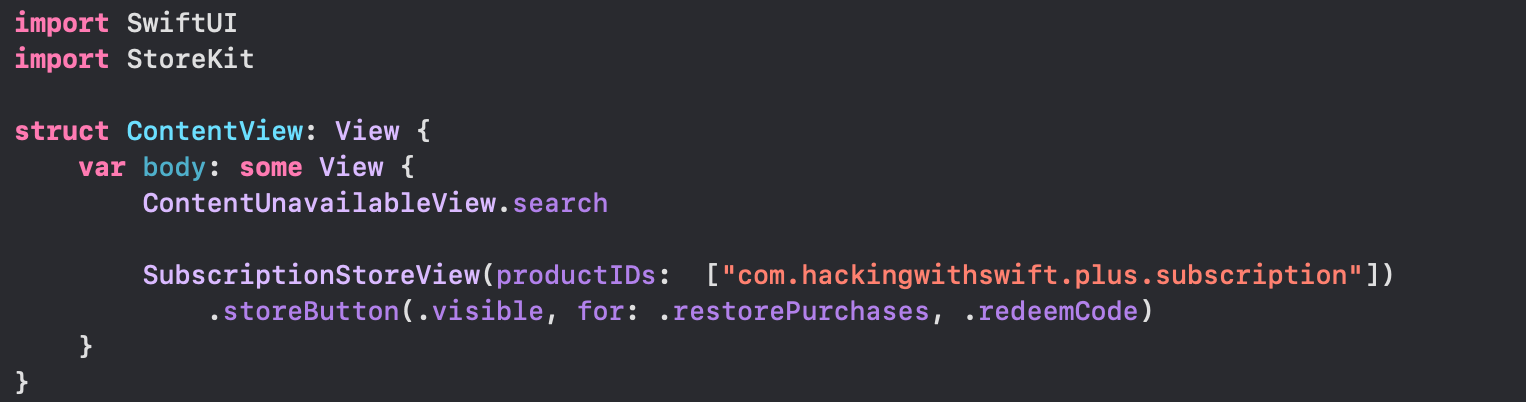
Implementation of an example of SubscriptionStoreView
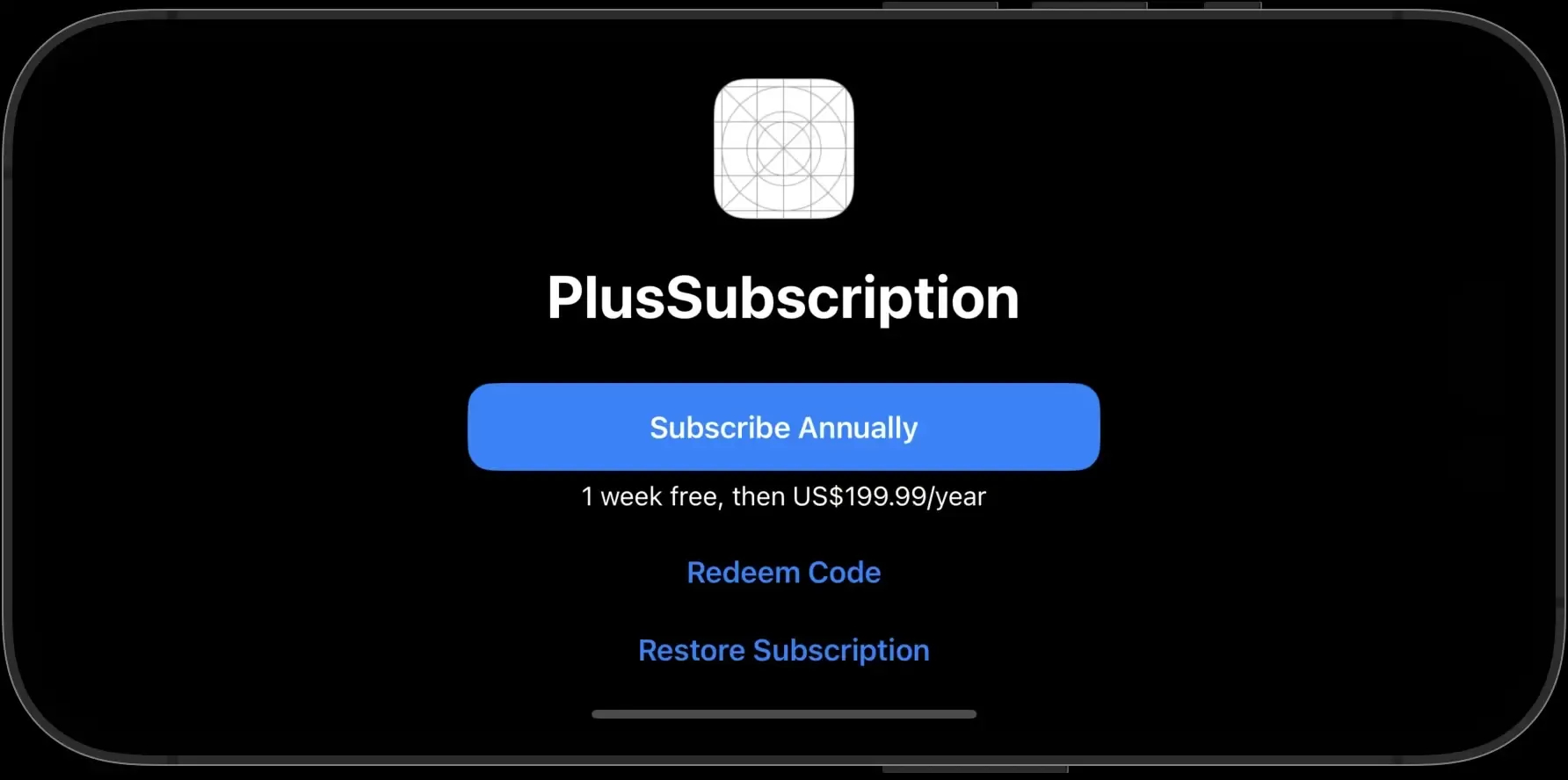
SubscriptionStoreView Result
- The modifier for graphical elements .foregroundColor(a very nostalgic name to those who started with UIKit) that accepts a Color in the signature is being deprecated (i.e., its use is now discouraged since it will no longer be available in the next few years) starting this year in favor of the new foregroundStyle that accepts the same type of parameter.
- No more non-existent images from now you will be able to add images in the Asset catalog as variables avoiding the risk of typo in writing the image name (from Image("foo") to Image(.foo)).
- Through the new modifer buttonRepeatBehaviour(.enabled) it will be possible to trigger the action of a Button simply by continuing to press it.
- ScrollView 2.0 Always proving to be one of the most widely used components, the ScrollView this year gets many small add-ons that enhance its versatility and ease of use. Among them:
- The ability to make indicators appear as soon as the scrollView appears with the modifier scrollIndicatorFlash(onAppear: true). Among other things, this modifier can also be applied to the List.
- If we want to start our ScrollView from the bottom, such as in messaging apps, we can use the new modifier .scrollPosition(initialAnchor: .bottom).
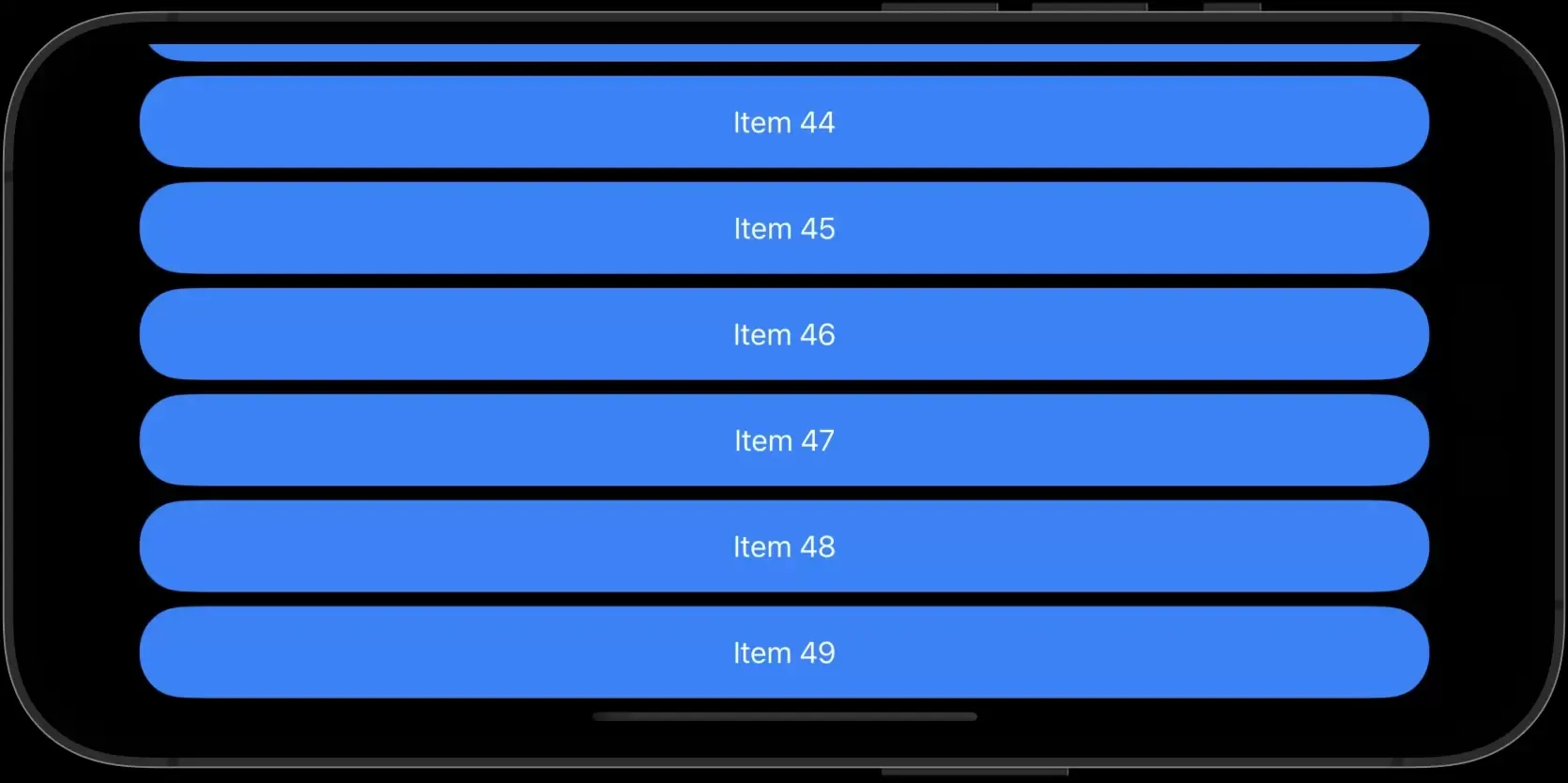
Example of the bottom initialAnchor
Source: Hakingswift
- We can choose the type of scrolling in a carousel with the .scrollTargetBehavior(.viewAligned) modifier, if centered in the element to be represented or .scrollTargetBehavior(.paging) if we want to scroll by one element only the list of elements
- Possiamo inoltre creare una completion (blocco di codice) quando un’animazione finisce scrivendo withAnimation { trigger booleano }, completion: { … }.
When you don't have anything to show...Mother Apple takes care of it
Apple winks at a case that has never been handled and that "puts a patch" on UI for those who want to give their apps a more "native" feel: with iOS 17, iPadOS 17 and macOS 14, a view called ContentUnavailableView has been introduced for UIKit and SwiftUI that allows in just a few steps to create context in the case of a search with no results or a list with no items.
Before, in fact, the developer in the case of a search without results or empty list had to create a custom view to show; now instead, with a few lines of code (in this example using SwiftUI) it will be possible to have the view as in the second image.
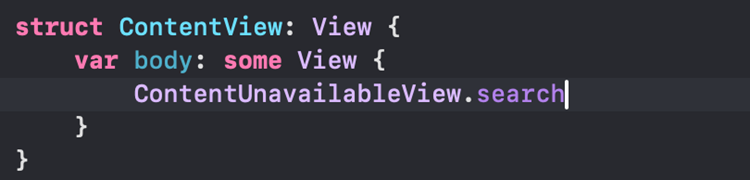
Example of ContentUnavailableView
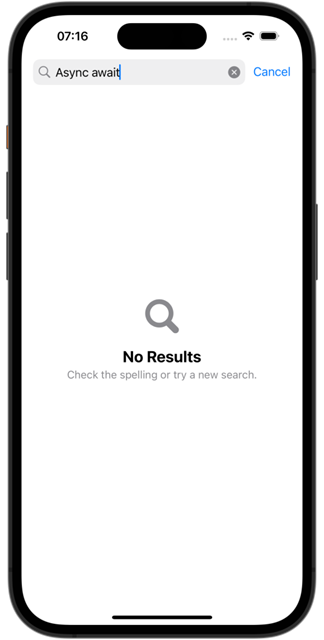
Simulator result
SwiftData, a breath of fresh air for DBs
SwiftData, Apple's new offering, a new fast, powerful and easy-to-use way to save data on all operating systems, even the newest VisionOS.
Apple, starting with Core Data, listened to all the positive and negative feedback from devs to make a product that fits nicely with SwiftUI (it can also be integrated with UIKit but is not optimized).
The first steps are quite intuitive because, in the wake of SwiftUI, you want to simplify what is code writing. Here are the first steps for writing an app that includes SwiftData:
- Create a model class into whose file we will import SwiftData and adding the @Macro prefix to it
- In the app file to the WindowGroup we add the modifier .modelContainer(MyClassOfModel.self)
Unfortunately, support starts with iOS 17 and age-matched OS versions of other devices, which breaks the legs a bit for new introductions but I'm sure it will find a place in a few years when older versions are removed from supported versions of apps.
If you are interested in learning more, we can analyze it in depth in a subsequent article!
Xcode: centralize localization--now you can!
Feature that I personally had missed introduced since this summer with Xcode 15 is the ability to create String Catalogs; that is, the ability to centralize the many localization files (the translations of the texts in the various languages supported by the app) in a single file where you can keep track of the translations.
It will create a kind of table with the translation keys as rows and the various languages as columns, also indicating the percentage of completion for languages other than the default (generally English). Pearl not to give pigs the option of flagging the keys with a "revision needed" label in case it needs double-checking.
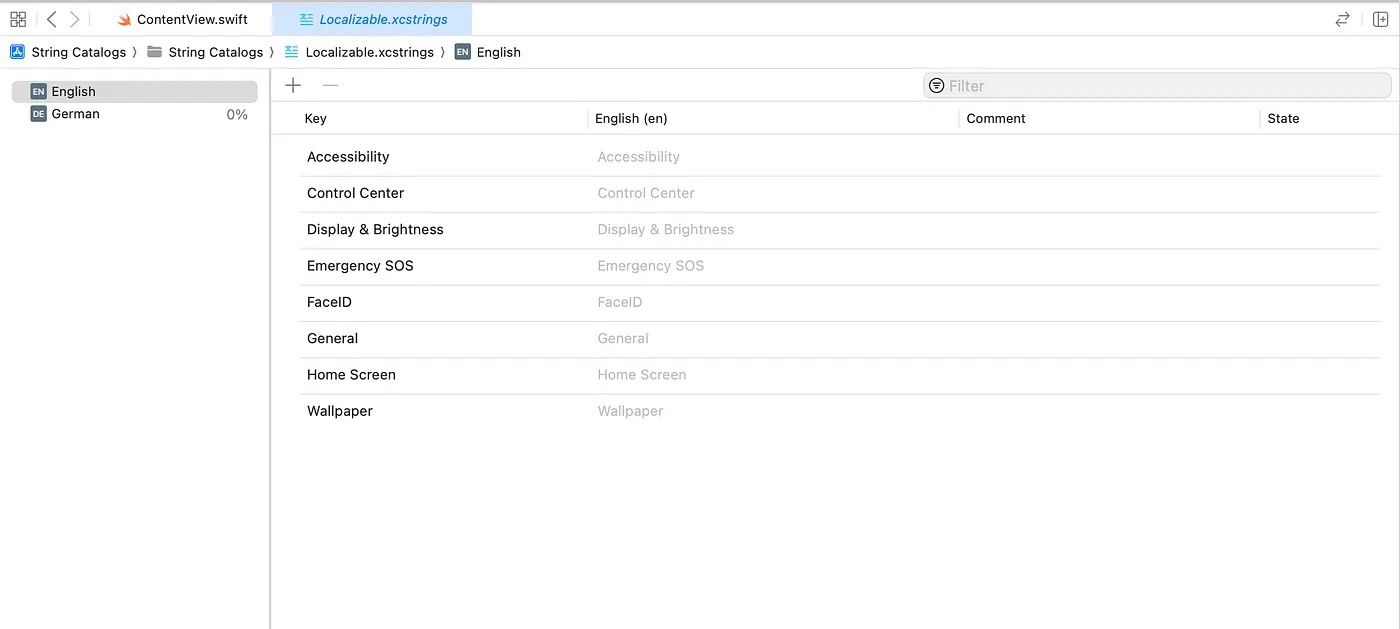
Example implementation of a String Catalog
Vision Pro: new device, new OS
What was unusual in recent years in fact was that of a joint hardware and software presentation: the entry of a new device that had been much talked about in previous months, the Vision Pro, with its associated ad-hoc operating system (visionOS) made the event a hybrid between the usual WWDC and the event held in September where Apple's home mobile devices are unveiled.
This mixed-reality viewer will surely set new standards in the category, and the decidedly high price ($3500) will discourage many casual-fans from buying it in these early months.
On the developer side, on the other hand , the downloadable simulator (software eh) from what I could see performs well enough to get familiar with new gestures and APIs, while waiting for it to be available in physical device released just these days.
The device has a Digital Crown (similar to that of the Apple Watch) placed on the upper right side and an external battery that provides between 2 and 2.5 hours of use. The speakers , on the other hand, are placed near the ears to create a feeling of high-immersion spatial audio.
Design also plays a very important factor and creates trends and milestones in the industry: soft lines and continuous interplay between fabrics (thread and back band) and metals (the body of the visor itself).

Home page device page
Source: Apple
The new Klondike: boundless opportunities with an app store to be created
This new device, definitely unique compared to all the others from the Cupertino company, has opened a scenario that immediately appeared clear: the possibility and the need to create a dedicated app store from scratch, and like a new Klondike, I am sure that many developers and designers in recent months have already been working on applications that take advantage of the power and potential of this visor. We are going to see some great things!
Does creating new apps still in UIKit in 2024 still make sense?
In recent years the opinion has changed and by a lot wanting to answer this question objectively. Starting more than 3 years ago with "UIKit and SwiftUI are equally valid frameworks for creating an app," continuing with "We have added so many ways to bring UIKit components into SwiftUI, so you can use SwiftUI-only APIs," and last year the message was lapidary "SwiftUI is the best way to create an app."
At the crucial moment of creating a new app, the choice between the two frameworks can make a difference in the short but especially in the long run: taking the right direction (in terms of longevity) in this regard can save a lot of extra work in the years to come.
This year, I have a feeling that UIKit has received the coup de grace. Certainly the large company market will delay this transition to a total conversion of their proprietary applications to SwiftUI, but the dense indie market will undoubtedly benefit from this boost given by the parent company in terms of creative freedom.
Certainly ContentUnavailableView will be very useful to me in projects given the benefit it gives, and if I were to start a new project from scratch with no minimum version constraints I would definitely use SwiftData as my DB. Other minor new features listed in this article are definitely minor and situational in impact but personally relevant.
In conclusion, the advent of the visor and the important innovations presented certainly made the past edition very juicy. We will find out together whether this summer's edition will exceed expectations in a few months.